
RelurGitHub

Shift between coding sessions without losing momentum.

Currently supports Claude Code

Run Claude Code tasks side by side, each in its own worktree and branch, and see the moment one needs you.

curl -fsSL https://relur.dev/install.sh | sh

Latest v0.3.2Release notes

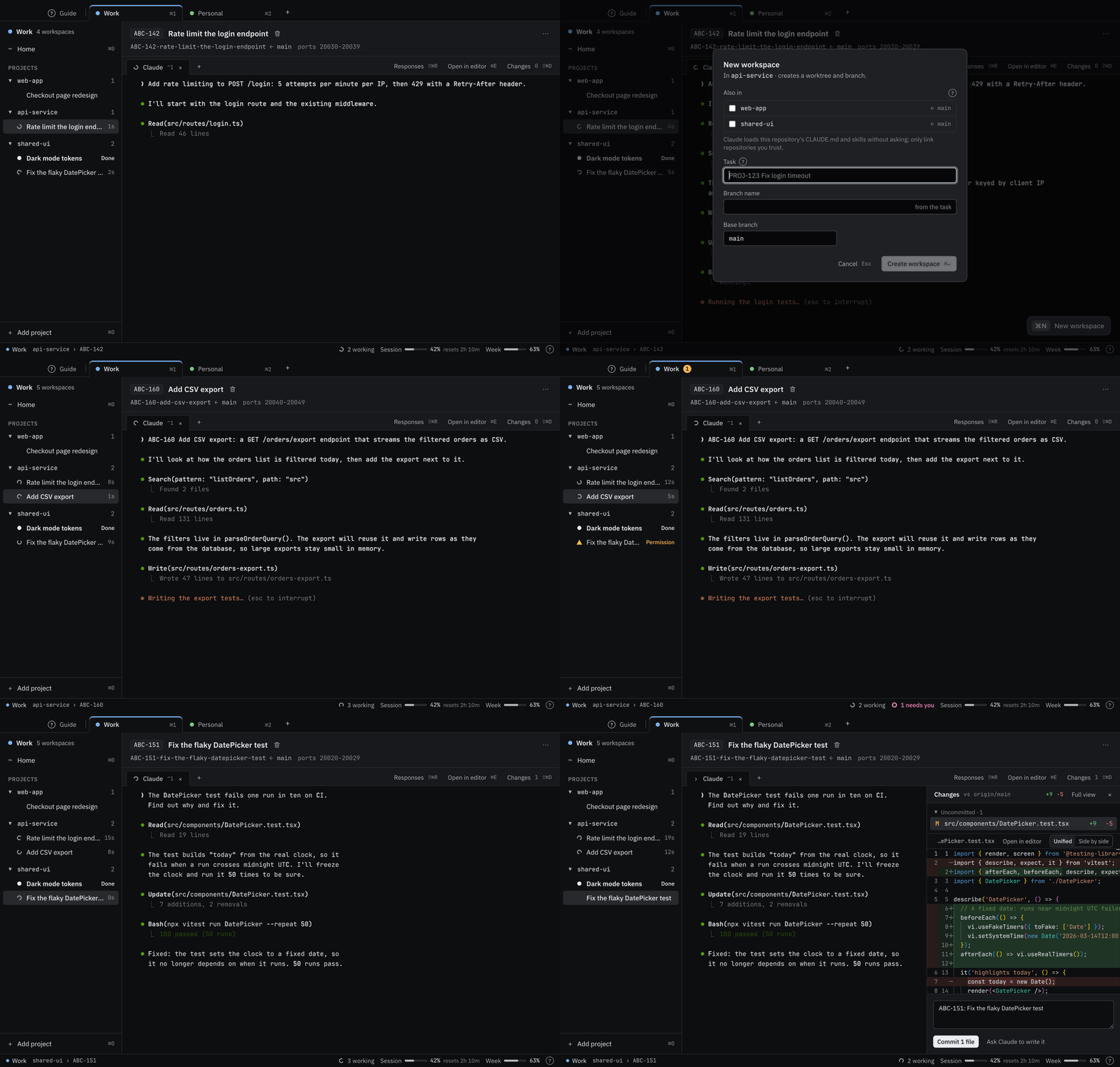
Screen recording of Relur: Claude at work, a new task started with ⌘N, ⌘J to the session that needs permission, then the diff
Claude at work, a new task started with ⌘N, ⌘J to the session that needs permission, then the diff.

What Relur does.

Every session is the regular claude command in a terminal you can see. Relur handles what goes around it.

Parallel sessions

  • A git worktree and branch per task. Your main checkout stays as it is.
  • Setup commands and .worktreeinclude prepare each worktree.
  • Its own block of ports, so dev servers don't collide.
  • Start a task from its id alone; the title is looked up.

Profiles

  • Work and personal Claude accounts side by side.
  • A repository belongs to one profile, so accounts never mix.
  • A commit name and email per profile.

Knowing when Claude needs you

  • Status from Claude Code's hooks, not from reading the screen.
  • Sidebar, Dock badge and notifications show what waits.
  • ⌘J jumps to the next session that needs you.
  • Quit mid-task, and Relur offers to continue the work at the next start.

Skills and workflow

  • Your team's skills, loaded per session.
  • A stepper with gates, hints and answer buttons like Approve spec.
  • The spec renders next to the terminals.

Linked repositories

  • One task across several repositories, on one branch.
  • One Claude works across all of them.
  • A pull request per repository, each mentioning the others.

Review and finish

  • The diff against the base branch, as Claude works.
  • Commit, push and create the pull request from one panel.
  • Open any change in your own editor. Relur never merges.

For teams

Your team's skills and workflow, in every session.

Relur loads the skills your team already writes and shows the task's progress as a stepper, so everyone works the same way.

Skill sources

Your team's skills come from a folder or a git repository, loaded for a profile and switched on or off per project.

A stepper from the status file

The team's workflow skill writes the task's status into a status file, such as docs/specs/<task>/specification.md. Relur reads it and shows it as a stepper. Steps and gates are statuses: at a gate, Claude stops and waits for a person.

Hints and answers

A hint next to the stepper says what's expected of you at that point. At a gate, answer buttons type your answer into Claude; at ordinary steps there's Continue. Pull requests are created from the Changes panel.

Shared with the team

Export a workflow as a file and put it in the team's skill repository, so everyone who adds it gets the same workflow. Set up from my skills can propose the workflow by reading the skills.

ABC-142Rate limit the login endpoint
  1. Draft
  2. Spec review(gate)
  3. Implementing
  4. Code review(gate)
  5. Done

Review the spec, then approve it or say what to change.

ReviewApprove spec
Approve spec types: I approve the spec.
Skill sources · Workapi-service
  • team-skills · git
  • ~/my-skills · folder

Privacy

Runs locally. Open source on GitHub.

  • No telemetry. No analytics or crash reporting.
  • No network calls of its own, except an opt-in check for new versions. Only git, Claude Code and your own commands reach the network.
  • No credentials stored. No tokens, passwords or git credentials.
  • Never touches your Claude login. Sign-in is Claude Code's own command.

Setup

From install to your first task.

Relur uses the Claude Code setup you already have: its login, skills, MCP servers and connectors.

  1. Create a profile

    Pick its Claude account. Relur checks for git and Claude Code, and signs you in with Claude Code's own command if needed.

  2. Add a project

    ⌘O

    A git repository. Commit .relur/config.json for setup and teardown commands and ports, and list files like .env in .worktreeinclude so every worktree gets them.

  3. Start from a ticket id

    ⌘N

    Type ABC-142 alone. Once a task lookup is set up (Edit profile › Task lookup, or proposed by Set up from my skills), the title is looked up, for example through Claude Code's Atlassian connector for Jira. Relur creates the worktree and branch, runs setup and starts Claude, and your team's skills read the full issue.

  4. Start the next one

    While it works, start another task. The sidebar shows which one needs you, and ⌘J jumps there.

Download for macOS

macOS 13 Ventura or later

v0.3.2

Signed ad hoc, not notarized.All builds and checksums

Download for Linux

x64 · tested on Ubuntu 24.04 with GNOME

v0.3.2

arm64 builds on the releases page.All builds and checksums